|
TrioCFD 1.9.8
TrioCFD documentation
|

|
TrioCFD 1.9.8
TrioCFD documentation
|
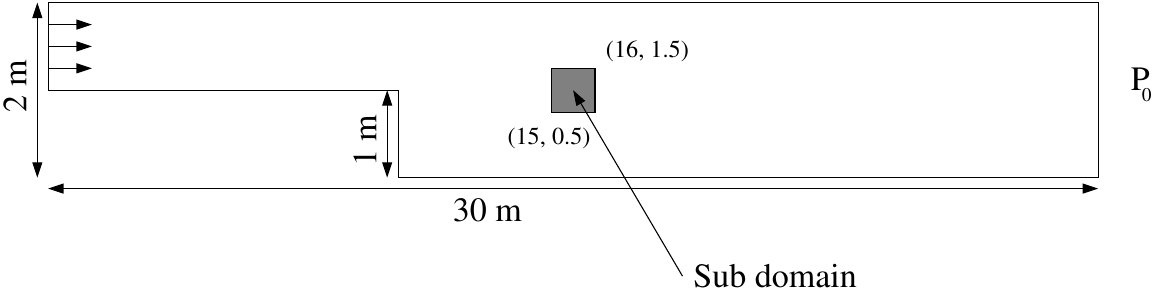
This tutorial demonstrates how to simulate a 2D incompressible turbulent flow with constituent transport using TrioCFD's k-ε model. The figure below shows the geometry of the test case you will run in this tutorial.
| Property | Value |
|---|---|
| Dynamic viscosity \(\mu\) | \(3.7 \cdot 10^{-5} kg \cdot m^{-1} \cdot s^{-1}\) |
| Density \(\rho\) | \(2 kg \cdot m^{-3}\) |
| Reynolds number \(Re\) | 54,054 |
| Location | Velocity | Pressure | k | ε | Notes |
|---|---|---|---|---|---|
| Inlet | \(U_0 = 1 m \cdot s^{-1}\) | - | \(10^{-2}\) | \(10^{-3}\) | Imposed velocity, dimensionless k and ε |
| Outlet | - | \(P_0 = 0\) | 0 | 0 | Constant pressure |
| Top/Bottom walls | \(U = 0\) | - | Standard flux | Null | No-slip condition |
To start, copy the base Marche study, which provides a foundation for 2D incompressible turbulent flow using the k-ε model.
For this tutorial, start from an empty directory, e.g. TrioCFD_tutorial_turb_concentration and source the TrioCFD environment (see the Quick Start). Then, execute the following command:
Since we'll be working with constituent diffusion, the Constituants study also needs to be copied as it demonstrates 2D incompressible laminar flow with constituents:
Documentation access is available through the TrioCFD index system, which provides access to the Reference Manual containing the necessary keywords for problem configuration:
You can also find this information in the TrioCFD Documentation.
First, open the Marche.data file.
The data file modification begins by renaming the problem to accommodate concentration equations.
Check the TrioCFD Reference Manual to find the appropriate keywords.
Then, add 3 constituents of equal diffusivities ( \(\alpha = 1 m \cdot s^{-1}\)) in the problem block after the fluid definition.
Define the concentration equation into the problem with the correct initial ( \(C_1 = C_2 = C_3 = 0\)) and boundary conditions. Remember that concentrations are a vector of 3 components.
Use the Schmidt model to close the turbulence model in the concentration equation.
Change the Navier-Stokes turbulence model to an anisotropic concentration-coupled version: Source_Transport_K_Eps_aniso_concen { C1_eps 1.44 C2_eps 1.92 C3_eps 1. }
This modification ensures proper coupling between the flow field and concentration transport.
Additionally, the fluid definition must include a volume expansion coefficient for concentration (beta_co) set as a uniform field equal to 0, along with a gravity field initialized to 0.
Try to run your updated test case:
Now, you will define the sub-domain shown in grey in the geometry figure above.
To do so, you will need to use the Sous_Zone keyword. To find an example of the Sous_Zone keyword usage, run the following:
It will give you the list of TRUST test cases that use this keyword. You can for example edit the PCR.data file of the PCR test case.
The second constituent requires a specific source term (S₂ = 1 m⁻³) applied exclusively to the defined sub-domain. This implementation uses the Champ_Uniforme_Morceaux keyword to ensure spatial localization of the source effects.
Now, add a source term for the second constituent only ( \(S_2 = 1 m^{-3}\)) applied on the sub-domain thanks to the keyword Champ_Uniforme_Morceaux.
Change post-processing format from lml to lata in the post-processing block.
Add the keywords concentration0, concentration1, concentration2 in the fields of the post-processing block to write the 3 concentrations into the .lata file.
Run the calculation:
And check the results with Visit. You will be able to see the different concentrations.
 1.16.1