Keywords introduced by TRUST that extend the Interprete family. See Keywords derived from interprete for the base-class documentation and the canonical keyword list.
analyse_angle
Keyword Analyse_angle prints the histogram of the largest angle of each mesh elements of the domain named name_domain. nb_histo is the histogram number of bins. It is called by default during the domain discretization with nb_histo set to 18. Useful to check the number of elements with angles above 90 degrees.
Parameters:
- domain_name (type: string) Name of domain to resequence.
- nb_histo (type: int) not_set
analyse_angle_64
Analyse_angle for big (64b) domain.
Parameters:
- domain_name (type: string) Name of domain to resequence.
- nb_histo (type: int) not_set
associate
Synonyms: associer
This interpretor allows one object to be associated with another. The order of the two objects in this instruction is not important. The object objet_2 is associated to objet_1 if this makes sense; if not either objet_1 is associated to objet_2 or the program exits with error because it cannot execute the Associate (Associer) instruction. For example, to calculate water flow in a pipe, a Pb_Hydraulique type object needs to be defined. But also a Domaine type object to represent the pipe, a time discretization object (Scheme_euler_explicit for ex.). These two objects must then be associated with the problem.
Parameters:
- objet_1 (type: string) Objet_1
- objet_2 (type: string) Objet_2
axi
This keyword allows a 3D calculation to be executed using cylindrical coordinates (R,$\jolitheta$,Z). If this instruction is not included, calculations are carried out using Cartesian coordinates.
bidim_axi
Keyword allowing a 2D calculation to be executed using axisymetric coordinates (R, Z). If this instruction is not included, calculations are carried out using Cartesian coordinates.
calculer_moments
Calculates and prints the torque (moment of force) exerted by the fluid on each boundary in output files (.out) of the domain nom_dom.
Parameters:
cgns_to_lata
Synonyms: cgns_2_lata
To convert results file written with CGNS format to a single LATA file.
Parameters:
- file_cgns (type: string) CGNS file to convert to the new format.
- file_lata (type: string) Name of the single LATA file.
create_domain_from_sub_domain
Synonyms: create_domain_from_sous_zone, create_domain_from_sub_domains
This keyword fills the domain domaine_final with the subdomaine par_sous_zone from the domain domaine_init. It is very useful when meshing several mediums with Gmsh. Each medium will be defined as a subdomaine into Gmsh. A MED mesh file will be saved from Gmsh and read with Lire_Med keyword by the TRUST data file. And with this keyword, a domain will be created for each medium in the TRUST data file.
Parameters:
- [domaine_final] (type: string) new domain in which faces are stored
- [par_sous_zone | par_sous_dom] (type: string) a sub-area (a group in a MED file) allowing to choose the elements
- domaine_init (type: string) initial domain
criteres_convergence
convergence criteria
Parameters:
- aco (type: string into ['{']) Opening curly bracket.
- [inco] (type: string) Unknown (i.e: alpha, temperature, velocity and pressure)
- [val] (type: float) Convergence threshold
- acof (type: string into ['}']) Closing curly bracket.
debog
Class to debug some differences between two TRUST versions on a same data file.
If you want to compare the results of the same code in sequential and parallel calculation, first run (mode=0) in sequential mode (the files fichier1 and fichier2 will be written first) then the second run in parallel calculation (mode=1).
During the first run (mode=0), it prints into the file DEBOG, values at different points of the code thanks to the C++ instruction call. see for example in Kernel/Framework/Resoudre.cpp file the instruction: Debog::verifier(msg,value); Where msg is a string and value may be a double, an integer or an array.
During the second run (mode=1), it prints into a file Err_Debog.dbg the same messages than in the DEBOG file and checks if the differences between results from both codes are less than a given value (error). If not, it prints Ok else show the differences and the lines where it occured.
Parameters:
- pb (type: string) Name of the problem to debug.
- fichier1 | file1 (type: string) Name of the file where domain will be written in sequential calculation.
- fichier2 | file2 (type: string) Name of the file where faces will be written in sequential calculation.
- seuil (type: float) Minimal value (by default 1.e-20) for the differences between the two codes.
- mode (type: int) By default -1 (nothing is written in the different files), you will set 0 for the sequential run, and 1 for the parallel run.
declarer_bord_perio
Synonyms: corriger_frontiere_periodique
The Declarer_bord_perio keyword is mandatory to first define the periodic boundaries, to reorder the faces and eventually fix unaligned nodes of these boundaries. Faces on one side of the periodic domain are put first, then the faces on the opposite side, in the same order. It must be run in sequential before mesh splitting.
Parameters:
- domaine (type: string) Name of domain.
- bord (type: string) the name of the boundary (which must contain two opposite sides of the domain)
- [direction] (type: list of float) defines the periodicity direction vector (a vector that points from one node on one side to the opposite node on the other side). This vector must be given if the automatic algorithm fails, that is: - when the node coordinates are not perfectly periodic - when the periodic direction is not aligned with the normal vector of the boundary faces
- [fichier_post] (type: string) .
- [declare_only] (type: flag) flag if added will only add the periodic boundary without calling corriger_frontiere_periodique
decoupebord
Synonyms: decoupebord_pour_rayonnement
To subdivide the external boundary of a domain into several parts (may be useful for better accuracy when using radiation model in transparent medium). To specify the boundaries of the fine_domain_name domain to be splitted. These boundaries will be cut according the coarse mesh defined by either the keyword domaine_grossier (each boundary face of the coarse mesh coarse_domain_name will be used to group boundary faces of the fine mesh to define a new boundary), either by the keyword nb_parts_naif (each boundary of the fine mesh is splitted into a partition with nx*ny*nz elements), either by a geometric condition given by a formulae with the keyword condition_geometrique. If used, the coarse_domain_name domain should have the same boundaries name of the fine_domain_name domain.
A mesh file (ASCII format, except if binaire option is specified) named by default newgeom (or specified by the nom_fichier_sortie keyword) will be created and will contain the fine_domain_name domain with the splitted boundaries named boundary_nameI (where I is between from 0 and n-1). Furthermore, several files named boundary_nameI and boundary_name_xv will be created, containing the definition of the subdived boundaries. newgeom will be used to calculate view factors with geom2ansys script whereas only the boundary_name_xv files will be necessary for the radiation calculation. The file listb will contain the list of the boundaries boundary_nameI.
Parameters:
- domaine (type: string) not_set
- [domaine_grossier] (type: string) not_set
- [nb_parts_naif] (type: list of int) not_set
- [nb_parts_geom] (type: list of int) not_set
- [condition_geometrique] (type: list of str) not_set
- bords_a_decouper (type: list of str) not_set
- [nom_fichier_sortie] (type: string) not_set
- [binaire] (type: int) not_set
decouper_bord_coincident
In case of non-coincident meshes and a paroi_contact condition, run is stopped and two external files are automatically generated in VEF (connectivity_failed_boundary_name and connectivity_failed_pb_name.med). In 2D, the keyword Decouper_bord_coincident associated to the connectivity_failed_boundary_name file allows to generate a new coincident mesh.
Parameters:
- domain_name (type: string) Name of domain.
- bord (type: string) connectivity_failed_boundary_name
dilate
Keyword to multiply the whole coordinates of the geometry.
Parameters:
- domain_name (type: string) Name of domain.
- alpha (type: float) Value of dilatation coefficient.
disable_tu
Flag to disable the writing of the .TU files
discretiser_domaine
Useful to discretize the domain domain_name (faces will be created) without defining a problem.
Parameters:
- domain_name (type: string) Name of the domain.
discretize
Synonyms: discretiser
Keyword to discretise a problem problem_name according to the discretization dis.
IMPORTANT: A number of objects must be already associated (a domain, time scheme, central object) prior to invoking the Discretize (Discretiser) keyword. The physical properties of this central object must also have been read.
Parameters:
- problem_name (type: string) Name of problem.
- dis (type: string) Name of the discretization object.
distance_paroi
Class to generate external file Wall_length.xyz devoted for instance, for mixing length modelling. In this file, are saved the coordinates of each element (center of gravity) of dom domain and minimum distance between this point and boundaries (specified bords) that user specifies in data file (typically, those associated to walls). A field Distance_paroi is available to post process the distance to the wall.
Parameters:
- dom (type: string) Name of domain.
- bords (type: list of str) Boundaries.
- format (type: string into ['binaire', 'formatte']) Value for format may be binaire (a binary file Wall_length.xyz is written) or formatte (moreover, a formatted file Wall_length_formatted.xyz is written).
ecrire_champ_med
Keyword to write a field to MED format into a file.
Parameters:
- nom_dom (type: string) domain name
- nom_chp (type: string) field name
- file (type: string) file name
ecrire_fichier_formatte
Keyword to write the object of name name_obj to a file filename in ASCII format.
Parameters:
- name_obj (type: string) Name of the object to be written.
- filename (type: string) Name of the file.
ecrire_fichier_xyz_valeur
This keyword is used to write the values of a field only for some boundaries in a text file with the following format: n_valeur
x_1 y_1 [z_1] val_1
...
x_n y_n [z_n] val_n
The created files are named : pbname_fieldname_[boundaryname]_time.dat
Parameters:
- [binary_file] (type: flag) To write file in binary format
- [dt] (type: float) File writing frequency
- [fields] (type: list of str) Names of the fields we want to write
- [boundaries] (type: list of str) Names of the boundaries on which to write fields
ecrire_med
Synonyms: write_med
Write a domain to MED format into a file.
Parameters:
- nom_dom (type: string) Name of domain.
- file (type: string) Name of file.
ecriturelecturespecial
Class to write or not to write a .xyz file on the disk at the end of the calculation.
Parameters:
- type (type: string) If set to 0 (the default), no xyz file is created. If set to 1, the .xyz file is written at the end of the computation.
execute_parallel
This keyword allows to run several computations in parallel on processors allocated to TRUST. The set of processors is split in N subsets and each subset will read and execute a different data file. Error messages usualy written to stderr and stdout are redirected to .log files (journaling must be activated).
Parameters:
- liste_cas (type: list of str) N datafile1 ... datafileN. datafileX the name of a TRUST data file without the .data extension.
- [nb_procs] (type: list of int) nb_procs is the number of processors needed to run each data file. If not given, TRUST assumes that computations are sequential.
extract_2d_from_3d
Keyword to extract a 2D mesh by selecting a boundary of the 3D mesh. To generate a 2D axisymmetric mesh prefer Extract_2Daxi_from_3D keyword.
Parameters:
- dom3d (type: string) Domain name of the 3D mesh
- bord (type: string) Boundary name. This boundary becomes the new 2D mesh and all the boundaries, in 3D, attached to the selected boundary, give their name to the new boundaries, in 2D.
- dom2d (type: string) Domain name of the new 2D mesh
extract_2daxi_from_3d
Keyword to extract a 2D axisymetric mesh by selecting a boundary of the 3D mesh.
Parameters:
- dom3d (type: string) Domain name of the 3D mesh
- bord (type: string) Boundary name. This boundary becomes the new 2D mesh and all the boundaries, in 3D, attached to the selected boundary, give their name to the new boundaries, in 2D.
- dom2d (type: string) Domain name of the new 2D mesh
extraire_domaine
Keyword to create a new domain built with the domain elements of the pb_name problem verifying the two conditions given by Condition_elements. The problem pb_name should have been discretized.
Parameters:
- domaine (type: string) Domain in which faces are saved
- probleme (type: string) Problem from which faces should be extracted
- [condition_elements] (type: string) not_set
- [sous_domaine | sous_zone] (type: string) not_set
extraire_plan
This keyword extracts a plane mesh named domain_name (this domain should have been declared before) from the mesh of the pb_name problem. The plane can be either a triangle (defined by the keywords Origine, Point1, Point2 and Triangle), either a regular quadrangle (with keywords Origine, Point1 and Point2), or either a generalized quadrangle (with keywords Origine, Point1, Point2, Point3). The keyword Epaisseur specifies the thickness of volume around the plane which contains the faces of the extracted mesh. The keyword via_extraire_surface will create a plan and use Extraire_surface algorithm. Inverse_condition_element keyword then will be used in the case where the plane is a boundary not well oriented, and avec_certains_bords_pour_extraire_surface is the option related to the Extraire_surface option named avec_certains_bords. Point1, Point2 and Triangle), either a regular quadrangle (with keywords Origine, Point1 and Point2), or either a generalized quadrangle (with keywords Origine, Point1, Point2, Point3). The keyword Epaisseur specifies the thickness of volume around the plane which contains the faces of the extracted mesh. The keyword via_extraire_surface will create a plan and use Extraire_surface algorithm. Inverse_condition_element keyword then will be used in the case where the plane is a boundary not well oriented, and avec_certains_bords_pour_extraire_surface is the option related to the Extraire_surface option named avec_certains_bords.
Parameters:
- domaine (type: string) domain name
- probleme (type: string) pb_name
- origine (type: list of float) not_set
- point1 (type: list of float) not_set
- point2 (type: list of float) not_set
- [point3] (type: list of float) not_set
- [triangle] (type: flag) not_set
- epaisseur (type: float) thickness
- [via_extraire_surface] (type: flag) not_set
- [inverse_condition_element] (type: flag) not_set
- [avec_certains_bords_pour_extraire_surface] (type: list of str) name of boundaries to include when extracting plan
extraire_surface
This keyword extracts a surface mesh named domain_name (this domain should have been declared before) from the mesh of the pb_name problem. The surface mesh is defined by one or two conditions. The first condition is about elements with Condition_elements. For example: Condition_elements x*x+y*y+z*z<1
Will define a surface mesh with external faces of the mesh elements inside the sphere of radius 1 located at (0,0,0). The second condition Condition_faces is useful to give a restriction.
By default, the faces from the boundaries are not added to the surface mesh excepted if option avec_les_bords is given (all the boundaries are added), or if the option avec_certains_bords is used to add only some boundaries. The first condition is about elements with Condition_elements. For example: Condition_elements x*x+y*y+z*z<1
Will define a surface mesh with external faces of the mesh elements inside the sphere of radius 1 located at (0,0,0). The second condition Condition_faces is useful to give a restriction.
By default, the faces from the boundaries are not added to the surface mesh excepted if option avec_les_bords is given (all the boundaries are added), or if the option avec_certains_bords is used to add only some boundaries.
Parameters:
- domaine (type: string) Domain in which faces are saved
- probleme (type: string) Problem from which faces should be extracted
- [condition_elements] (type: string) condition on center of elements
- [condition_faces] (type: string) not_set
- [avec_les_bords] (type: flag) not_set
- [avec_certains_bords] (type: list of str) not_set
extrudebord
Class to generate an extruded mesh from a boundary of a tetrahedral or an hexahedral mesh.
Warning: If the initial domain is a tetrahedral mesh, the boundary will be moved in the XY plane then extrusion will be applied (you should maybe use the Transformer keyword on the final domain to have the domain you really want). You can use the keyword Postraiter_domaine to generate a lata|med|... file to visualize your initial and final meshes.
This keyword can be used for example to create a periodic box extracted from a boundary of a tetrahedral or a hexaedral mesh. This periodic box may be used then to engender turbulent inlet flow condition for the main domain.
Note that ExtrudeBord in VEF generates 3 or 14 tetrahedra from extruded prisms.
Parameters:
- domaine_init (type: string) Initial domain with hexaedras or tetrahedras.
- direction (type: list of float) Directions for the extrusion.
- nb_tranches (type: int) Number of elements in the extrusion direction.
- domaine_final (type: string) Extruded domain.
- nom_bord (type: string) Name of the boundary of the initial domain where extrusion will be applied.
- [hexa_old] (type: flag) Old algorithm for boundary extrusion from a hexahedral mesh.
- [trois_tetra] (type: flag) To extrude in 3 tetrahedras instead of 14 tetrahedras.
- [vingt_tetra] (type: flag) To extrude in 20 tetrahedras instead of 14 tetrahedras.
- [sans_passer_par_le2d] (type: int) Only for non-regression
extrudeparoi
Keyword dedicated in 3D (VEF) to create prismatic layer at wall. Each prism is cut into 3 tetraedra.
Parameters:
- domaine (type: string) Name of the domain.
- nom_bord (type: string) Name of the (no-slip) boundary for creation of prismatic layers.
- [epaisseur] (type: list of float) n r1 r2 .... rn : (relative or absolute) width for each layer.
- [critere_absolu] (type: flag) use absolute width for each layer instead of relative.
- [projection_normale_bord] (type: flag) keyword to project layers on the same plane that contiguous boundaries. defaut values are : epaisseur_relative 1 0.5 projection_normale_bord 1
extruder
Class to create a 3D tetrahedral/hexahedral mesh (a prism is cut in 14) from a 2D triangular/quadrangular mesh.
Parameters:
- domaine | domain_name (type: string) Name of the domain.
- nb_tranches (type: int) Number of elements in the extrusion direction.
- direction (type: troisf) Direction of the extrude operation.
extruder_en20
It does the same task as Extruder except that a prism is cut into 20 tetraedra instead of
- The name of the boundaries will be devant (front) and derriere (back). But you can change these names with the keyword RegroupeBord.
Parameters:
- domaine | domain_name (type: string) Name of the domain.
- nb_tranches (type: int) Number of elements in the extrusion direction.
- [direction] (type: troisf) 0 Direction of the extrude operation.
extruder_en3
Class to create a 3D tetrahedral/hexahedral mesh (a prism is cut in 3) from a 2D triangular/quadrangular mesh. The names of the boundaries (by default, devant (front) and derriere (back)) may be edited by the keyword nom_cl_devant and nom_cl_derriere. If 'null' is written for nom_cl, then no boundary condition is generated at this place.
Recommendation : to ensure conformity between meshes (in case of fluid/solid coupling) it is recommended to extrude all the domains at the same time.
Parameters:
- domaine | domain_name (type: list of str) List of the domains
- [nom_cl_devant] (type: string) New name of the first boundary.
- [nom_cl_derriere] (type: string) New name of the second boundary.
- nb_tranches (type: int) Number of elements in the extrusion direction.
- direction (type: troisf) Direction of the extrude operation.
facsec_expert
To parameter the safety factor for the time step during the simulation.
Parameters:
- [facsec_ini] (type: float) Initial facsec taken into account at the beginning of the simulation.
- [facsec_max] (type: float) Maximum ratio allowed between time step and stability time returned by CFL condition. The initial ratio given by facsec keyword is changed during the calculation with the implicit scheme but it couldn\'t be higher than facsec_max value. Warning: Some implicit schemes do not permit high facsec_max, example Schema_Adams_Moulton_order_3 needs facsec=facsec_max=1. Advice: The calculation may start with a facsec specified by the user and increased by the algorithm up to the facsec_max limit. But the user can also choose to specify a constant facsec (facsec_max will be set to facsec value then). Faster convergence has been seen and depends on the kind of calculation: -Hydraulic only or thermal hydraulic with forced convection and low coupling between velocity and temperature (Boussinesq value beta low), facsec between 20-30-Thermal hydraulic with forced convection and strong coupling between velocity and temperature (Boussinesq value beta high), facsec between 90-100 -Thermohydralic with natural convection, facsec around 300 -Conduction only, facsec can be set to a very high value (1e8) as if the scheme was unconditionally stableThese values can also be used as rule of thumb for initial facsec with a facsec_max limit higher.
- [rapport_residus] (type: float) Ratio between the residual at time n and the residual at time n+1 above which the facsec is increased by multiplying by sqrt(rapport_residus) (1.2 by default).
- [nb_ite_sans_accel_max] (type: int) Maximum number of iterations without facsec increases (20000 by default): if facsec does not increase with the previous condition (ration between 2 consecutive residuals too high), we increase it by force after nb_ite_sans_accel_max iterations.
imprimer_flux
This keyword prints the flux per face at the specified domain boundaries in the data set. The fluxes are written to the .face files at a frequency defined by dt_impr, the evaluation printing frequency (refer to time scheme keywords). By default, fluxes are incorporated onto the edges before being displayed.
Parameters:
- domain_name (type: string) Name of the domain.
- noms_bord (type: bloc_lecture) List of boundaries, for ex: { Bord1 Bord2 }
imprimer_flux_sum
This keyword prints the sum of the flux per face at the domain boundaries defined by the user in the data set. The fluxes are written into the .out files at a frequency defined by dt_impr, the evaluation printing frequency (refer to time scheme keywords).
Parameters:
- domain_name (type: string) Name of the domain.
- noms_bord (type: bloc_lecture) List of boundaries, for ex: { Bord1 Bord2 }
integrer_champ_med
his keyword is used to calculate a flow rate from a velocity MED field read before. The method is either debit_total to calculate the flow rate on the whole surface, either integrale_en_z to calculate flow rates between z=zmin and z=zmax on nb_tranche surfaces. The output file indicates first the flow rate for the whole surface and then lists for each tranche : the height z, the surface average value, the surface area and the flow rate. For the debit_total method, only one tranche is considered.
file :z Sum(u.dS)/Sum(dS) Sum(dS) Sum(u.dS)
Parameters:
- champ_med (type: string) not_set
- methode (type: string into ['integrale_en_z', 'debit_total']) to choose between the integral following z or over the entire height (debit_total corresponds to zmin=-DMAXFLOAT, ZMax=DMAXFLOAT, nb_tranche=1)
- [zmin] (type: float) not_set
- [zmax] (type: float) not_set
- [nb_tranche] (type: int) not_set
- [fichier_sortie] (type: string) name of the output file, by default: integrale.
interprete_geometrique_base
Class for interpreting a data file
lata_to_cgns
Synonyms: lata_2_cgns
To convert results file written with LATA format to CGNS file. Warning: Fields located on faces are not supported yet.
Parameters:
- file (type: string) LATA file to convert to the new format.
- file_cgns (type: string) Name of the CGNS file.
lata_to_med
Synonyms: lata_2_med
To convert results file written with LATA format to MED file. Warning: Fields located on faces are not supported yet.
Parameters:
- [format] (type: format_lata_to_med) generated file post_med.data use format (MED or LATA or LML keyword).
- file (type: string) LATA file to convert to the new format.
- file_med (type: string) Name of the MED file.
lata_to_other
Synonyms: lata_2_other
To convert results file written with LATA format to CGNS, MED or LML format. Warning: Fields located at faces are not supported yet.
Parameters:
- [format] (type: string into ['lml', 'lata', 'lata_v2', 'med', 'cgns']) Results format (CGNS, MED or LATA or LML keyword).
- file (type: string) LATA file to convert to the new format.
- file_post (type: string) Name of file post.
lire_ideas
Read a geom in a unv file. 3D tetra mesh elements only may be read by TRUST.
Parameters:
- nom_dom (type: string) Name of domain.
- file (type: string) Name of file.
lire_med_64
Did the same thing as Read_MED for big (64b) domain
Parameters:
- [convertalltopoly] (type: flag) Option to convert mesh with mixed cells into polyhedral/polygonal cells
- domain | domaine (type: string) Corresponds to the domain name.
- file | fichier (type: string) File (written in the MED format, with extension '.med') containing the mesh
- [mesh | maillage] (type: string) Name of the mesh in med file. If not specified, the first mesh will be read.
- [exclude_groups | exclure_groupes] (type: list of str) List of face groups to skip in the MED file.
- [sub_zones | sous_zones] (type: list of str) List of subzones to keep in the MED file and write directly in the .geo
- [include_additional_face_groups | inclure_groupes_faces_additionnels] (type: list of str) List of face groups to read and register in the MED file.
lml_to_lata
Synonyms: lml_2_lata
To convert results file written with LML format to a single LATA file.
Parameters:
- file_lml (type: string) LML file to convert to the new format.
- file_lata (type: string) Name of the single LATA file.
mailler
The Mailler (Mesh) interpretor allows a Domain type object domaine to be meshed with objects objet_1, objet_2, etc...
Parameters:
- domaine (type: string) Name of domain.
- bloc (type: list of Mailler_base) List of block mesh.
mailler_64
The Mailler (Mesh) interpretor allows a big (64b) domain type object domaine to be meshed with objects objet_1, objet_2, etc...
Parameters:
- domaine (type: string) Name of domain.
- bloc (type: list of Mailler_base) List of block mesh.
maillerparallel
creates a parallel distributed hexaedral mesh of a parallelipipedic box. It is equivalent to creating a mesh with a single Pave, splitting it with Decouper and reloading it in parallel with Scatter. It only works in 3D at this time. It can also be used for a sequential computation (with all NPARTS=1)}
Parameters:
- domain (type: string) the name of the domain to mesh (it must be an empty domain object).
- nb_nodes (type: list of int) dimension defines the spatial dimension (currently only dimension=3 is supported), and nX, nY and nZ defines the total number of nodes in the mesh in each direction.
- splitting (type: list of int) dimension is the spatial dimension and npartsX, npartsY and npartsZ are the number of parts created. The product of the number of parts must be equal to the number of processors used for the computation.
- ghost_thickness (type: int) the number of ghost cells (equivalent to the epaisseur_joint parameter of Decouper.
- [perio_x] (type: flag) change the splitting method to provide a valid mesh for periodic boundary conditions. Register the corresponding boundary in the list of periodic boundaries for the domain.
- [perio_y] (type: flag) change the splitting method to provide a valid mesh for periodic boundary conditions. Register the corresponding boundary in the list of periodic boundaries for the domain.
- [perio_z] (type: flag) change the splitting method to provide a valid mesh for periodic boundary conditions. Register the corresponding boundary in the list of periodic boundaries for the domain.
- [function_coord_x] (type: string) By default, the meshing algorithm creates nX nY nZ coordinates ranging between 0 and 1 (eg a unity size box). If function_coord_x} is specified, it is used to transform the [0,1] segment to the coordinates of the nodes. funcX must be a function of the x variable only.
- [function_coord_y] (type: string) like function_coord_x for y
- [function_coord_z] (type: string) like function_coord_x for z
- [file_coord_x] (type: string) Keyword to read the Nx floating point values used as nodes coordinates in the file.
- [file_coord_y] (type: string) idem file_coord_x for y
- [file_coord_z] (type: string) idem file_coord_x for z
- [boundary_xmin] (type: string) the name of the boundary at the minimum X direction. If it not provided, the default boundary names are xmin, xmax, ymin, ymax, zmin and zmax. If the mesh is periodic in a given direction, only the MIN boundary name is used, for both sides of the box.
- [boundary_xmax] (type: string) not_set
- [boundary_ymin] (type: string) not_set
- [boundary_ymax] (type: string) not_set
- [boundary_zmin] (type: string) not_set
- [boundary_zmax] (type: string) not_set
mass_source
Mass source used in a dilatable simulation to add/reduce a mass at the boundary (volumetric source in the first cell of a given boundary).
Parameters:
- bord (type: string) Name of the boundary where the source term is applied
- surfacic_flux (type: front_field_base) The boundary field that the user likes to apply: for example, champ_front_uniforme, ch_front_input_uniform or champ_front_fonc_t
merge_med
This keyword allows to merge multiple MED files produced during a parallel computation into a single MED file.
Parameters:
- med_files_base_name (type: string) Base name of multiple med files that should appear as base_name_xxxxx.med, where xxxxx denotes the MPI rank number. If you specify NOM_DU_CAS, it will automatically take the basename from your datafile's name.
- time_iterations (type: string into ['all_times', 'last_time']) Identifies whether to merge all time iterations present in the MED files or only the last one.
mkdir
equivalent to system mkdir
Parameters:
- directory (type: string) directory to create
modif_bord_to_raccord
Keyword to convert a boundary of domain_name domain of kind Bord to a boundary of kind Raccord (named boundary_name). It is useful when using meshes with boundaries of kind Bord defined and to run a coupled calculation.
Parameters:
- domaine | domain (type: string) Name of domain
- nom_bord (type: string) Name of the boundary to transform.
modifydomaineaxi1d
Synonyms: convert_1d_to_1daxi
Convert a 1D mesh to 1D axisymmetric mesh
Parameters:
- dom (type: string) not_set
- bloc (type: bloc_lecture) not_set
moyenne_volumique
This keyword should be used after Resoudre keyword. It computes the convolution product of one or more fields with a given filtering function.
Parameters:
- nom_pb (type: string) name of the problem where the source fields will be searched.
- nom_domaine (type: string) name of the destination domain (for example, it can be a coarser mesh, but for optimal performance in parallel, the domain should be split with the same algorithm as the computation mesh, eg, same tranche parameters for example)
- noms_champs (type: list of str) name of the source fields (these fields must be accessible from the postraitement) N source_field1 source_field2 ... source_fieldN
- [format_post] (type: string) gives the fileformat for the result (by default : lata)
- [nom_fichier_post] (type: string) indicates the filename where the result is written
- fonction_filtre (type: bloc_lecture) to specify the given filter Fonction_filtre { type filter_type demie-largeur l [ omega w ] [ expression string ] } type filter_type : This parameter specifies the filtering function. Valid filter_type are: Boite is a box filter, $f(x,y,z)=(abs(x)<l)*(abs(y) <l)*(abs(z) <l) / (8 l^3)$ Chapeau is a hat filter (product of hat filters in each direction) centered on the origin, the half-width of the filter being l and its integral being 1. Quadra is a 2nd order filter. Gaussienne is a normalized gaussian filter of standard deviation sigma in each direction (all field elements outside a cubic box defined by clipping_half_width are ignored, hence, taking clipping_half_width=2.5*sigma yields an integral of 0.99 for a uniform unity field). Parser allows a user defined function of the x,y,z variables. All elements outside a cubic box defined by clipping_half_width are ignored. The parser is much slower than the equivalent c++ coded function... demie-largeur l : This parameter specifies the half width of the filter [ omega w ] : This parameter must be given for the gaussienne filter. It defines the standard deviation of the gaussian filter. [ expression string] : This parameter must be given for the parser filter type. This expression will be interpreted by the math parser with the predefined variables x, y and z.
- [localisation] (type: string into ['som', 'elem']) indicates where the convolution product should be computed: either on the elements or on the nodes of the destination domain.
multiplefiles
Change MPI rank limit for multiple files during I/O
Parameters:
- type (type: int) New MPI rank limit
my_comm_group
This keyword allows to create a user MPI Comm Group of size N using the processors allocated to TRUST. The set of processors is split in N subsets.
Parameters:
- group_nb (type: int) Number of groups to define in your Comm Group.
nettoiepasnoeuds
Keyword NettoiePasNoeuds does not delete useless nodes (nodes without elements) from a domain.
Parameters:
- domain_name (type: string) Name of domain.
op_conv_ef_stab_dg_elem
Class Op_Conv_EF_Stab_DG_Elem
op_conv_ef_stab_polymac_cdo_face
Class Op_Conv_EF_Stab_PolyMAC_CDO_Face_PolyMAC_CDO
Parameters:
- [alpha] (type: float) parameter adjusting stabilization from 0 (centered scheme) to 1 (upwind scheme)
op_conv_ef_stab_polymac_hfv_elem
Synonyms: op_conv_ef_stab_polymac_mpfa_elem
Class Op_Conv_EF_Stab_PolyMAC_HFV_Elem
Parameters:
- [alpha] (type: float) parameter adjusting stabilization from 0 (centered scheme) to 1 (upwind scheme)
op_conv_ef_stab_polymac_hfv_face
Class Op_Conv_EF_Stab_PolyMAC_HFV_Face
op_conv_ef_stab_polymac_mpfa_face
Class Op_Conv_EF_Stab_PolyMAC_MPFA_Face
option_cgns
Class for CGNS options.
Parameters:
- [parallel_over_zone] (type: flag) If used, data will be written in separate zones (ie: one zone per processor). This is not so performant but easier to read later ...
- [use_links] (type: flag) If used, data will be written in separate files; one file for mesh, and then one file for solution time. Links will be used.
- [linked_files_per_comm_group] (type: flag) If used, data will be written (at each comm group) in separate files; one file for mesh, and then one file for solution time. Links will be used.
- [single_file_per_comm_group] (type: flag) If used, data will be written (at each comm group) in a single file.
- [keep_files_before_reset_time] (type: flag) If used with resetTime, CGNS files will be kept. Otherwise the files are overwritten.
- [close_every_n] (type: int) Used to fix the opening/closing frequency when writing in a single CGNS file (choice by defaut).
- [flush_every_n] (type: int) Used to fix the flush-to-disc frequency when writing in a single CGNS file (choice by defaut).
option_dg
Class for DG options.
Parameters:
- [order] (type: int) global order for the DG unknowns (1 by default)
- [velocity_order] (type: int) optional order for DG velocity unknown
- [pressure_order] (type: int) optional order for DG pressure unknown
- [temperature_order] (type: int) optional order for DG temperature unknown
- [gram_schmidt] (type: int) Gram Schmidt orthogonalization (1 by default)
option_ijk
Class of IJK options.
Parameters:
- [check_divergence] (type: flag) Flag to compute and print the value of div(u) after each pressure-correction
- [disable_diphasique] (type: flag) Disable all calculations related to interfaces (phase properties, interfacial force, ... )
option_interpolation
Class for interpolation fields using MEDCoupling.
Parameters:
- [sans_dec | without_dec] (type: flag) Use remapper even for a parallel calculation
- [sharing_algo] (type: int) Setting the DEC sharing algo : 0,1,2
option_polymac_family
Synonyms: option_polymac
Class of PolyMAC options.
Parameters:
- [use_osqp] (type: flag) Flag to use the old formulation of the M2 matrix provided by the OSQP library. Only useful for PolyMAC_CDO version.
- [maillage_vdf | vdf_mesh] (type: flag) Flag used to force the calculation of the equiv tab.
- [interp_ve1] (type: flag) Flag to enable a first-order face-to-element velocity interpolation. By default, it is not activated which means a second order interpolation. Only useful for PolyMAC_MPFA version.
- [traitement_axi] (type: flag) Flag used to relax the time-step stability criterion in case of a thin slice geometry while modelling an axi-symetrical case. Only useful for PolyMAC_MPFA version.
option_vdf
Class of VDF options.
Parameters:
- [traitement_coins] (type: string into ['oui', 'non']) Treatment of corners (yes or no). This option modifies slightly the calculations at the outlet of the plane channel. It supposes that the boundary continues after channel outlet (i.e. velocity vector remains parallel to the boundary).
- [traitement_gradients] (type: string into ['oui', 'non']) Treatment of gradient calculations (yes or no). This option modifies slightly the gradient calculation at the corners and activates also the corner treatment option.
- [p_imposee_aux_faces] (type: string into ['oui', 'non']) Pressure imposed at the faces (yes or no).
- [deactivate_arete_mixte] (type: flag) Deactivate the arete_mixte contribution in the conv op of the momentum equation.
- [all_options | toutes_les_options] (type: flag) Activates all Option_VDF options. If used, must be used alone without specifying the other options, nor combinations.
orientefacesbord
Keyword to modify the order of the boundary vertices included in a domain, such that the surface normals are outer pointing.
Parameters:
- domain_name (type: string) Name of domain.
parallel_io_parameters
Object to handle parallel files in IJK discretization
Parameters:
- [block_size_bytes] (type: int) File writes will be performed by chunks of this size (in bytes). This parameter will not be taken into account if block_size_megabytes has been defined
- [block_size_megabytes] (type: int) File writes will be performed by chunks of this size (in megabytes). The size should be a multiple of the GPFS block size or lustre stripping size (typically several megabytes)
- [writing_processes] (type: int) This is the number of processes that will write concurrently to the file system (this must be set according to the capacity of the filesystem, set to 1 on small computers, can be up to 64 or 128 on very large systems).
- [bench_ijk_splitting_write] (type: string) Name of the splitting object we want to use to run a parallel write bench (optional parameter)
- [bench_ijk_splitting_read] (type: string) Name of the splitting object we want to use to run a parallel read bench (optional parameter)
partition
Synonyms: decouper
Class for parallel calculation to cut a domain for each processor. By default, this keyword is commented in the reference test cases.
Parameters:
- domaine (type: string) Name of the domain to be cut.
- bloc_decouper (type: bloc_decouper) Description how to cut a domain.
partition_multi
Synonyms: decouper_multi
allows to partition multiple domains in contact with each other in parallel: necessary for resolution monolithique in implicit schemes and for all coupled problems using PolyMAC_HFV. By default, this keyword is commented in the reference test cases.
Parameters:
- aco (type: string into ['{']) Opening curly bracket.
- domaine1 (type: string into ['domaine']) not set.
- dom (type: string) Name of the first domain to be cut.
- blocdecoupdom1 (type: bloc_decouper) Partition bloc for the first domain.
- domaine2 (type: string into ['domaine']) not set.
- dom2 (type: string) Name of the second domain to be cut.
- blocdecoupdom2 (type: bloc_decouper) Partition bloc for the second domain.
- acof (type: string into ['}']) Closing curly bracket.
pilote_icoco
not_set
Parameters:
- pb_name (type: string) not_set
- main (type: string) not_set
- [nb_pas_dt_reset] (type: int) number of time steps before a single call to resetTime(0) like the Cathare directive (default value 1000000000)
- [nstep_stabilized] (type: int) number of first iterations in which resetTime(0) is called as a Cathare stabilized transient (default value 0)
- [sortie_root_directory] (type: int) if enable, no save post before the resetTime(0) call (default value 0)
polyedriser
cast hexahedra into polyhedra so that the indexing of the mesh vertices is compatible with PolyMAC_HFV discretization. Must be used in PolyMAC_HFV discretization if a hexahedral mesh has been produced with TRUST's internal mesh generator.
Parameters:
- domain_name (type: string) Name of domain.
postraiter_domaine
To write one or more domains in a file with a specified format (MED,LML,LATA,SINGLE_LATA,CGNS).
Parameters:
- format (type: string into ['lml', 'lata', 'single_lata', 'lata_v2', 'med', 'cgns']) File format.
- [binaire] (type: int into [0, 1]) Binary (binaire 1) or ASCII (binaire 0) may be used. By default, it is 0 for LATA and only ASCII is available for LML and only binary is available for MED.
- [ecrire_frontiere] (type: int into [0, 1]) This option will write (if set to 1, the default) or not (if set to 0) the boundaries as fields into the file (it is useful to not add the boundaries when writing a domain extracted from another domain)
- [dual] (type: int into [0, 1]) This option indicates whether the original mesh (default) or the dual one (the one used for postprocessing of field faces) is to be written.
- [fichier | file] (type: string) The file name can be changed with the fichier option.
- [joints_non_postraites] (type: int into [0, 1]) The joints_non_postraites (1 by default) will not write the boundaries between the partitioned mesh.
- [domaine | domain] (type: string) Name of domain
- [domaines] (type: bloc_lecture) Names of domains : { name1 name2 }
precisiongeom
Class to change the way floating-point number comparison is done. By default, two numbers are equal if their absolute difference is smaller than 1e-10. The keyword is useful to modify this value. Moreover, nodes coordinates will be written in .geom files with this same precision.
Parameters:
- precision (type: float) New value of precision.
raffiner_anisotrope
Only for VEF discretizations, allows to cut triangle elements in 3, or tetrahedra in 4 parts, by defining a new summit located at the center of the element:
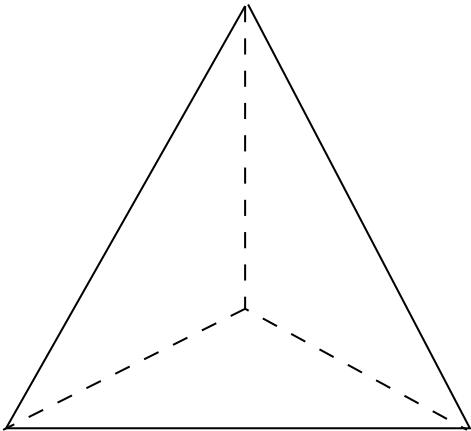
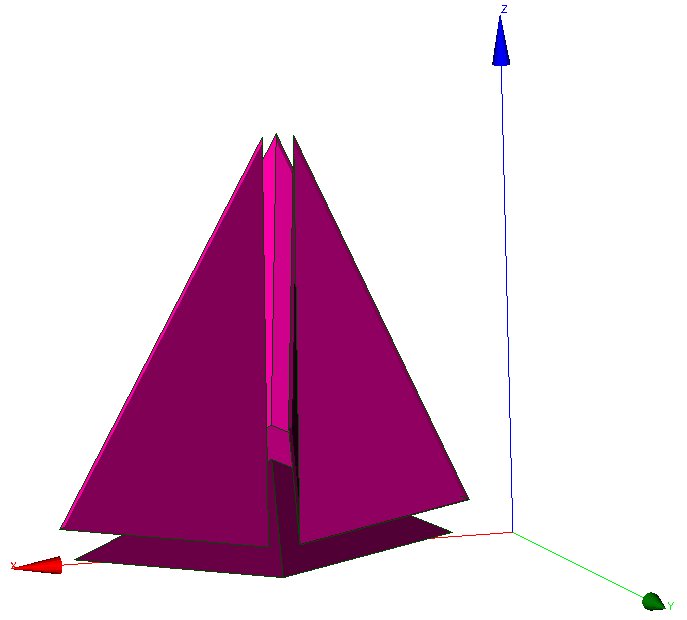
Note that such a cut creates flat elements (anisotropic).
Parameters:
- domain_name (type: string) Name of domain.
raffiner_isotrope
Synonyms: raffiner_simplexes
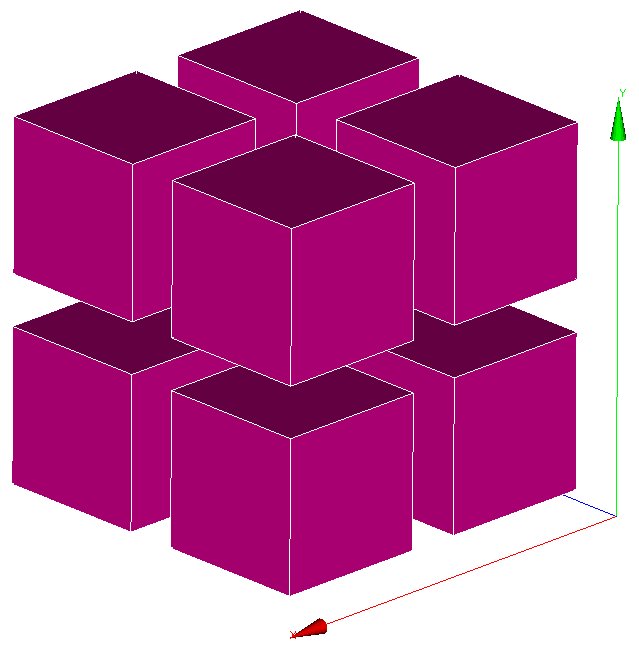
For VDF and VEF discretizations, allows to cut triangles/quadrangles or tetrahedral/hexaedras elements respectively in 4 or 8 new ones by defining new summits located at the middle of edges (and center of faces and elements for quadrangles and hexaedra). Such a cut preserves the shape of original elements (isotropic). For 2D elements: 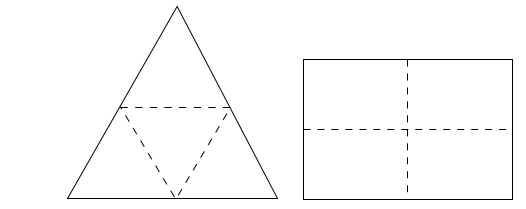
For 3D elements: 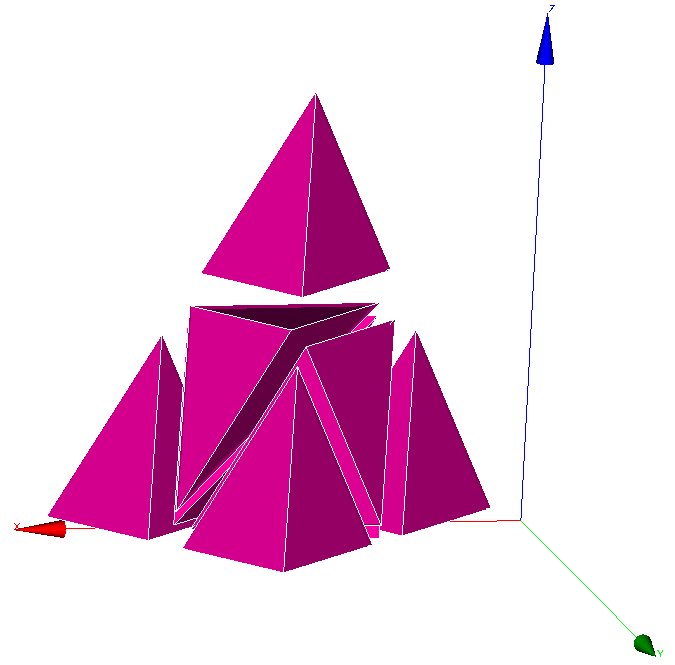
Parameters:
- domain_name (type: string) Name of domain.
raffiner_isotrope_parallele
Refine parallel mesh in parallel
Parameters:
- name_of_initial_domaines | name_of_initial_zones (type: string) name of initial Domaines
- name_of_new_domaines | name_of_new_zones (type: string) name of new Domaines
- [ascii] (type: flag) writing Domaines in ascii format
- [single_hdf] (type: flag) writing Domaines in hdf format
raffiner_simplexes_64
Same as Raffiner_isotrope and Raffiner_simplexes for big (64b) domain
Parameters:
- domain_name (type: string) Name of domain.
read_file
Synonyms: lire_fichier
Keyword to read the object name_obj contained in the file filename.
This is notably used when the calculation domain has already been meshed and the mesh contains the file filename, simply write read_file dom filename (where dom is the name of the meshed domain).
If the filename is ;, is to execute a data set given in the file of name name_obj (a space must be entered between the semi-colon and the file name).
Parameters:
- name_obj (type: string) Name of the object to be read.
- filename (type: string) Name of the file.
read_file_bin
Synonyms: lire_fichier_bin, read_file_binary
Keyword to read an object name_obj in the unformatted type file filename.
Parameters:
- name_obj (type: string) Name of the object to be read.
- filename (type: string) Name of the file.
read_med
Synonyms: lire_med
Keyword to read MED mesh files where 'domain' corresponds to the domain name, 'file' corresponds to the file (written in the MED format) containing the mesh named mesh_name.
Note about naming boundaries: When reading 'file', TRUST will detect boundaries between domains (Raccord) when the name of the boundary begins by 'type_raccord_'. For example, a boundary named type_raccord_wall in 'file' will be considered by TRUST as a boundary named 'wall' between two domains.
NB: To read several domains from a mesh issued from a MED file, use Read_Med to read the mesh then use Create_domain_from_sub_domain keyword.
NB: If the MED file contains one or several subdomaine defined as a group of volumes, then Read_MED will read it and will create two files domain_name_ssz.geo and domain_name_ssz_par.geo defining the subdomaines for sequential and/or parallel calculations. These subdomaines will be read in sequential in the datafile by including (after Read_Med keyword) something like:
Read_Med ....
Read_file domain_name_ssz.geo ;
During the parallel calculation, you will include something:
Scatter { ... }
Read_file domain_name_ssz_par.geo ;
Parameters:
- [convertalltopoly] (type: flag) Option to convert mesh with mixed cells into polyhedral/polygonal cells
- domain | domaine (type: string) Corresponds to the domain name.
- file | fichier (type: string) File (written in the MED format, with extension '.med') containing the mesh
- [mesh | maillage] (type: string) Name of the mesh in med file. If not specified, the first mesh will be read.
- [exclude_groups | exclure_groupes] (type: list of str) List of face groups to skip in the MED file.
- [sub_zones | sous_zones] (type: list of str) List of subzones to keep in the MED file and write directly in the .geo
- [include_additional_face_groups | inclure_groupes_faces_additionnels] (type: list of str) List of face groups to read and register in the MED file.
read_tgrid
Synonyms: lire_tgrid
Keyword to reaf Tgrid/Gambit mesh files. 2D (triangles or quadrangles) and 3D (tetra or hexa elements) meshes, may be read by TRUST.
Parameters:
- dom (type: string) Name of domaine.
- filename (type: string) Name of file containing the mesh.
read_unsupported_ascii_file_from_icem
not_set
Parameters:
- name_obj (type: string) Name of the object to be read.
- filename (type: string) Name of the file.
rectify_mesh
Synonyms: orienter_simplexes
Keyword to raffine a mesh
Parameters:
- domain_name (type: string) Name of domain.
redresser_hexaedres_vdf
Keyword to convert a domain (named domain_name) with quadrilaterals/VEF hexaedras which looks like rectangles/VDF hexaedras into a domain with real rectangles/VDF hexaedras.
Parameters:
- domain_name (type: string) Name of domain to resequence.
refine_mesh
not_set
Parameters:
- domaine (type: string) not_set
regroupebord
Keyword to build one boundary new_bord with several boundaries of the domain named domaine.
Parameters:
- domaine | domain (type: string) Name of domain
- new_bord (type: string) Name of the new boundary
- bords (type: bloc_lecture) { Bound1 Bound2 }
regroupebord_64
Keyword to build one boundary new_bord with several boundaries of the big (64b) domain named domaine.
Parameters:
- domaine | domain (type: string) Name of domain
- new_bord (type: string) Name of the new boundary
- bords (type: bloc_lecture) { Bound1 Bound2 }
remove_elem
Keyword to remove element from a VDF mesh (named domaine_name), either from an explicit list of elements or from a geometric condition defined by a condition f(x,y)>0 in 2D and f(x,y,z)>0 in 3D. All the new borders generated are gathered in one boundary called : newBord (to rename it, use RegroupeBord keyword. To split it to different boundaries, use decoupebord keyword). Example of a removed zone of radius 0.2 centered at (x,y)=(0.5,0.5):
Remove_elem dom { fonction $0.2*0.2-(x-0.5)^2-(y-0.5)^2>0$ }
Warning : the thickness of removed zone has to be large enough to avoid singular nodes as decribed below : 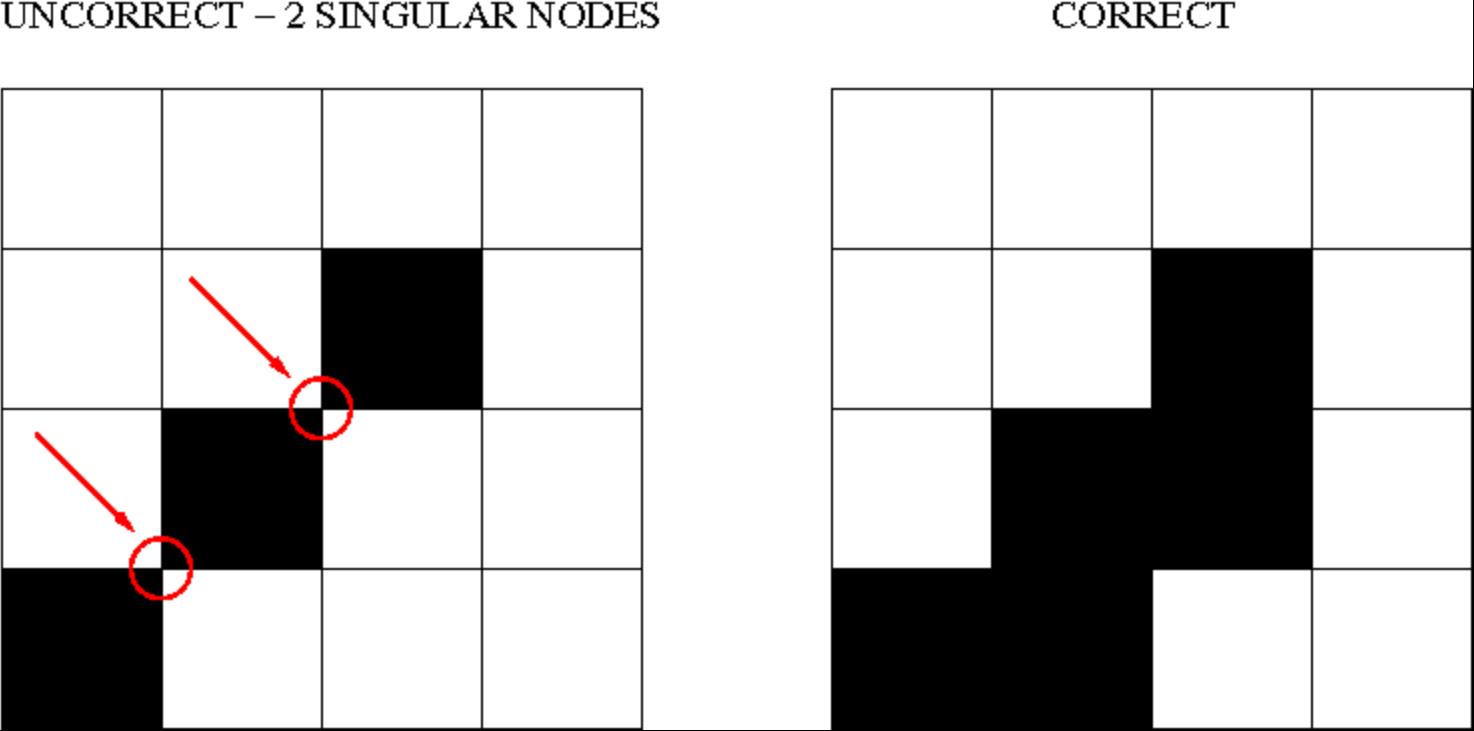
Parameters:
- domaine | domain (type: string) Name of domain
- bloc (type: remove_elem_bloc) not_set
remove_invalid_internal_boundaries
Keyword to suppress an internal boundary of the domain_name domain. Indeed, some mesh tools may define internal boundaries (eg: for post processing task after the calculation) but TRUST does not support it yet.
Parameters:
- domain_name (type: string) Name of domain.
reorienter_tetraedres
This keyword is mandatory for front-tracking computations with the VEF discretization. For each tetrahedral element of the domain, it checks if it has a positive volume. If the volume (determinant of the three vectors) is negative, it swaps two nodes to reverse the orientation of this tetrahedron.
Parameters:
- domain_name (type: string) Name of domain.
reorienter_triangles
not_set
Parameters:
- domain_name (type: string) Name of domain.
resequencing
Synonyms: reordonner
The Reordonner interpretor is required sometimes for a VDF mesh which is not produced by the internal mesher. Example where this is used:
Read_file dom fichier.geom
Reordonner dom
Observations: This keyword is redundant when the mesh that is read is correctly sequenced in the TRUST sense. This significant mesh operation may take some time... The message returned by TRUST is not explicit when the Reordonner (Resequencing) keyword is required but not included in the data set...
Parameters:
- domain_name (type: string) Name of domain to resequence.
residuals
To specify how the residuals will be computed.
Parameters:
- [norm] (type: string into ['l2', 'max']) allows to choose the norm we want to use (max norm by default). Possible to specify L2-norm.
- [relative] (type: string into ['0', '1', '2']) This is the old keyword seuil_statio_relatif_deconseille. If it is set to 1, it will normalize the residuals with the residuals of the first 5 timesteps (default is 0). if set to 2, residual will be computed as R/(max-min).
rotation
Keyword to rotate the geometry of an arbitrary angle around an axis aligned with Ox, Oy or Oz axis.
Parameters:
- domain_name (type: string) Name of domain to wich the transformation is applied.
- dir (type: string into ['x', 'y', 'z']) X, Y or Z to indicate the direction of the rotation axis
- coord1 (type: float) coordinates of the center of rotation in the plane orthogonal to the rotation axis. These coordinates must be specified in the direct triad sense.
- coord2 (type: float) not_set
- angle (type: float) angle of rotation (in degrees)
scatter
Class to read a partionned mesh from the files during a parallel calculation. The files are in binary format.
Parameters:
- file (type: string) Name of file.
- domaine (type: string) Name of domain.
scattermed
This keyword will read the partition of the domain_name domain into a the MED format files file.med created by Medsplitter.
Parameters:
- file (type: string) Name of file.
- domaine (type: string) Name of domain.
solve
Synonyms: resoudre
Interpretor to start calculation with TRUST.
Parameters:
- pb (type: string) Name of problem to be solved.
stat_per_proc_perf_log
Keyword allowing to activate the detailed statistics per processor (by default this is false, and only the master proc will produce stats).
Parameters:
- flg (type: int) A flag that can be either 0 or 1 to turn off (default) or on the detailed stats.
supprime_bord
Keyword to remove boundaries (named Boundary_name1 Boundary_name2 ) of the domain named domain_name.
Parameters:
- domaine | domain (type: string) Name of domain
- bords (type: list of Nom_anonyme) List of name.
system
To run Unix commands from the data file. Example: System \'echo The End | mail trust.nosp@m.@cea.nosp@m..fr\'
Parameters:
- cmd (type: string) command to execute.
test_solveur
To test several solvers
Parameters:
- [fichier_secmem] (type: string) Filename containing the second member B
- [fichier_matrice] (type: string) Filename containing the matrix A
- [fichier_solution] (type: string) Filename containing the solution x
- [nb_test] (type: int) Number of tests to measure the time resolution (one preconditionnement)
- [impr] (type: flag) To print the convergence solver
- [solveur] (type: solveur_sys_base) To specify a solver
- [fichier_solveur] (type: string) To specify a file containing a list of solvers
- [genere_fichier_solveur] (type: float) To create a file of the solver with a threshold convergence
- [seuil_verification] (type: float) Check if the solution satisfy ||Ax-B||<precision
- [pas_de_solution_initiale] (type: flag) Resolution isn\'t initialized with the solution x
- [ascii] (type: flag) Ascii files
test_sse_kernels
Object to test the different kernel methods used in the multigrid solver in IJK discretization
Parameters:
- [nmax] (type: int) Number of tests we want to perform
testeur
not_set
Parameters:
testeur_medcoupling
not_set
Parameters:
- pb_name (type: string) Name of domain.
- field_name | filed_name (type: string) Name of domain.
tetraedriser
To achieve a tetrahedral mesh based on a mesh comprising blocks, the Tetraedriser (Tetrahedralise) interpretor is used in VEF discretization. Initial block is divided in 6 tetrahedra: 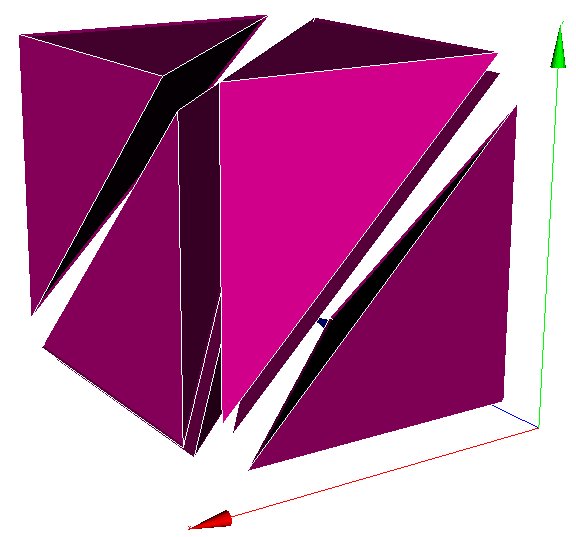
Parameters:
- domain_name (type: string) Name of domain.
tetraedriser_homogene
Use the Tetraedriser_homogene (Homogeneous_Tetrahedralisation) interpretor in VEF discretization to mesh a block in tetrahedrals. Each block hexahedral is no longer divided into 6 tetrahedrals (keyword Tetraedriser (Tetrahedralise)), it is now broken down into 40 tetrahedrals. Thus a block defined with 11 nodes in each X, Y, Z direction will contain 10*10*10*40=40,000 tetrahedrals. This also allows problems in the mesh corners with the P1NC/P1iso/P1bulle or P1/P1 discretization items to be avoided. Initial block is divided in 40 tetrahedra: 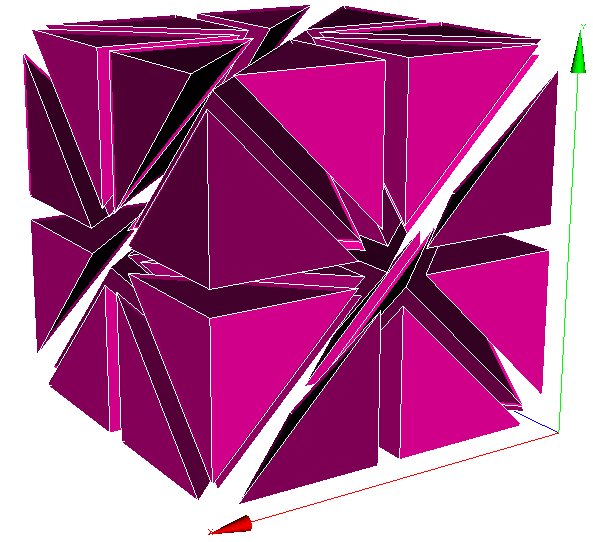
Parameters:
- domain_name (type: string) Name of domain.
tetraedriser_homogene_compact
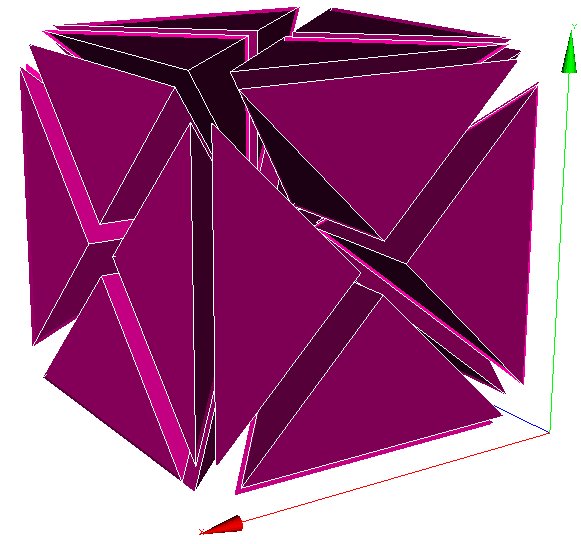
This new discretization generates tetrahedral elements from cartesian or non-cartesian hexahedral elements. The process cut each hexahedral in 6 pyramids, each of them being cut then in 4 tetrahedral. So, in comparison with tetra_homogene, less elements (*24 instead of*40) with more homogeneous volumes are generated. Moreover, this process is done in a faster way. Initial block is divided in 24 tetrahedra:
Parameters:
- domain_name (type: string) Name of domain.
tetraedriser_homogene_fin
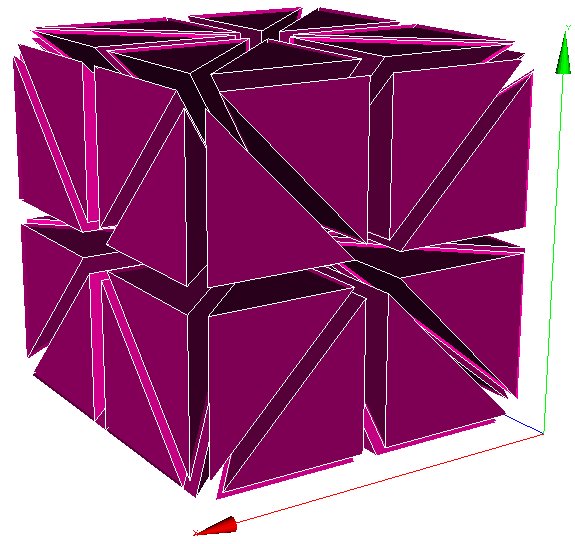
Tetraedriser_homogene_fin is the recommended option to tetrahedralise blocks. As an extension (subdivision) of Tetraedriser_homogene_compact, this last one cut each initial block in 48 tetrahedra (against 24, previously). This cutting ensures :
- a correct cutting in the corners (in respect to pressure discretization PreP1B),
- a better isotropy of elements than with Tetraedriser_homogene_compact,
- a better alignment of summits (this could have a benefit effect on calculation near walls since first elements in contact with it are all contained in the same constant thickness and ii/ by the way, a 3D cartesian grid based on summits can be engendered and used to realise spectral analysis in HIT for instance). Initial block is divided in 48 tetrahedra:
Parameters:
- domain_name (type: string) Name of domain.
tetraedriser_par_prisme
Tetraedriser_par_prisme generates 6 iso-volume tetrahedral element from primary hexahedral one (contrarily to the 5 elements ordinarily generated by tetraedriser). This element is suitable for calculation of gradients at the summit (coincident with the gravity centre of the jointed elements related with) and spectra (due to a better alignment of the points).
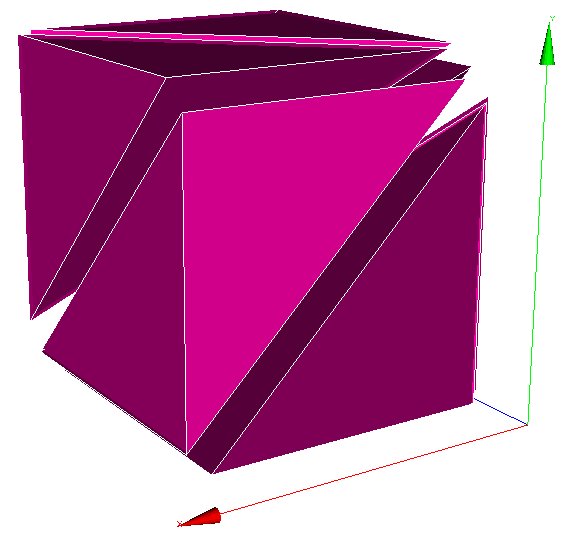
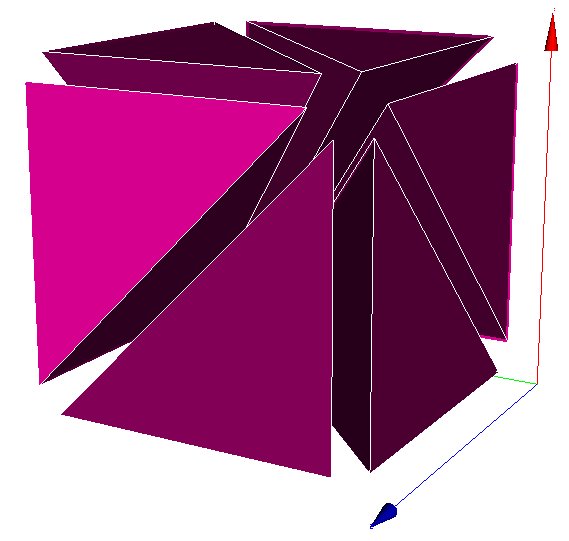
Initial block is divided in 6 prismes.
Parameters:
- domain_name (type: string) Name of domain.
transformer
Keyword to transform the coordinates of the geometry.
Exemple to rotate your mesh by a 90o rotation and to scale the z coordinates by a factor 2: Transformer domain_name -y -x 2*z
Parameters:
- domain_name (type: string) Name of domain.
- formule (type: list of str) Function_for_x Function_for_y [ Function_for z ]
transformer_64
Transformer keyword applied on a big mesh
Parameters:
- domain_name (type: string) Name of domain.
- formule (type: list of str) Function_for_x Function_for_y [ Function_for z ]
triangulate
Synonyms: trianguler
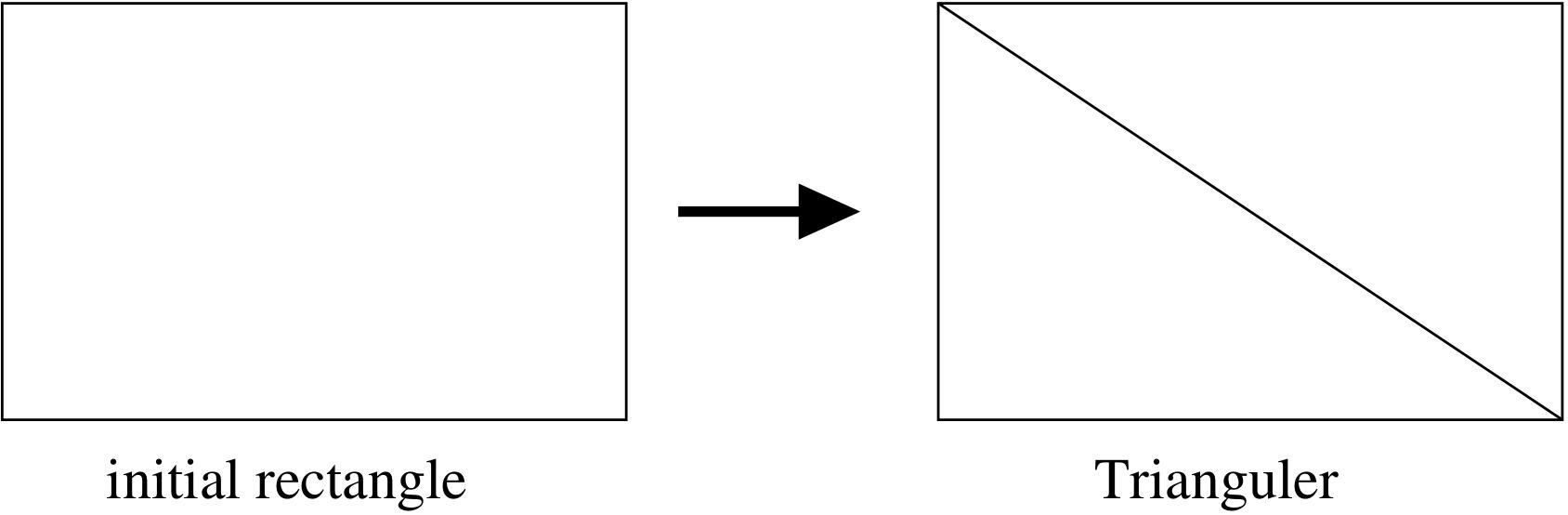
To achieve a triangular mesh from a mesh comprising rectangles (2 triangles per rectangle). Should be used in VEF discretization. Principle:
Parameters:
- domain_name (type: string) Name of domain.
trianguler_fin
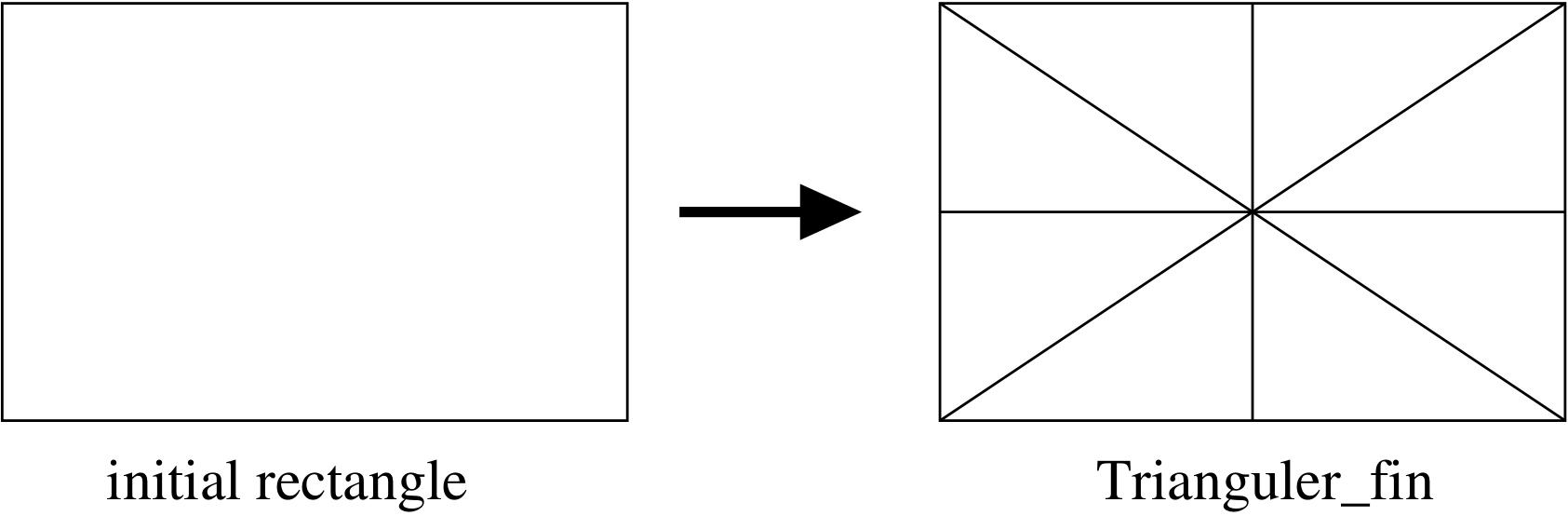
Trianguler_fin is the recommended option to triangulate rectangles.
As an extension (subdivision) of Triangulate_h option, this one cut each initial rectangle in 8 triangles (against 4, previously). This cutting ensures :
- a correct cutting in the corners (in respect to pressure discretization PreP1B).
- a better isotropy of elements than with Trianguler_h option.
- a better alignment of summits (this could have a benefit effect on calculation near walls since first elements in contact with it are all contained in the same constant thickness, and, by this way, a 2D cartesian grid based on summits can be engendered and used to realize statistical analysis in plane channel configuration for instance). Principle:
Parameters:
- domain_name (type: string) Name of domain.
trianguler_h
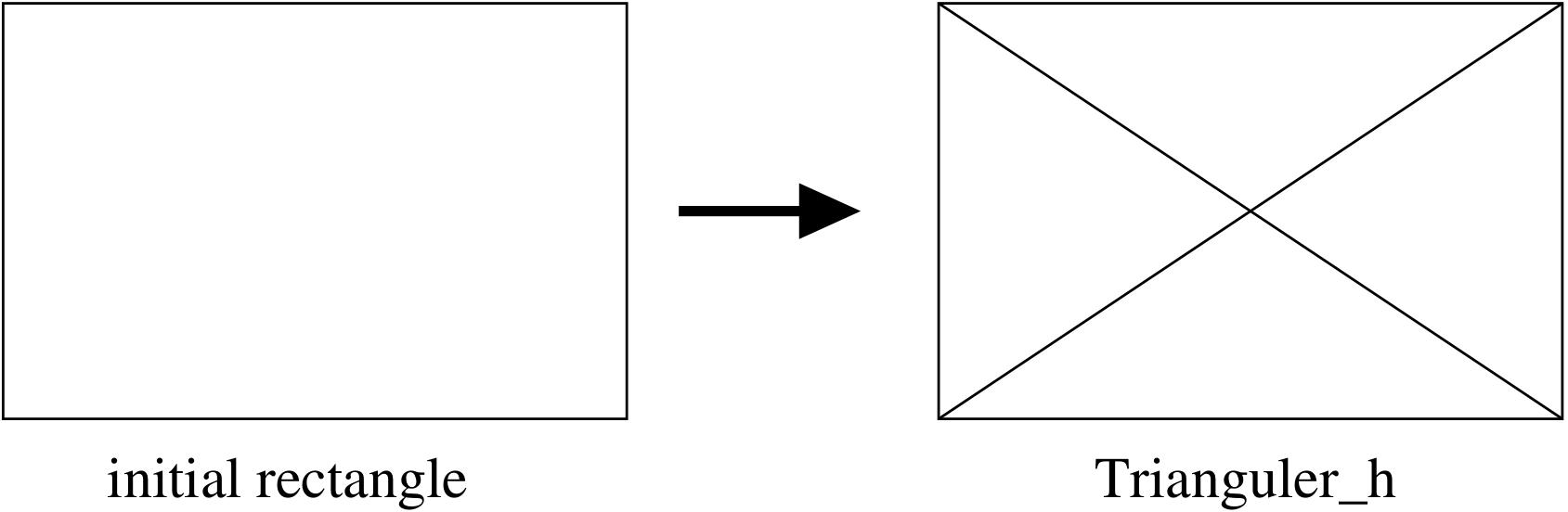
To achieve a triangular mesh from a mesh comprising rectangles (4 triangles per rectangle). Should be used in VEF discretization. Principle:
Parameters:
- domain_name (type: string) Name of domain.
verifier_qualite_raffinements
not_set
Parameters:
- domain_names (type: list of Nom_anonyme) Vect of name.
verifier_simplexes
Keyword to raffine a simplexes
Parameters:
- domain_name (type: string) Name of domain.
verifiercoin
This keyword subdivides inconsistent 2D/3D cells used with VEFPreP1B discretization. Must be used before the mesh is discretized. The Read_file option can be used only if the file.decoupage_som was previously created by TRUST. This option, only in 2D, reverses the common face at two cells (at least one is inconsistent), through the nodes opposed. In 3D, the option has no effect.
Parameters:
- domain_name | dom (type: string) Name of the domaine
- bloc (type: verifiercoin_bloc) not_set
write
Synonyms: ecrire
Keyword to write the object of name name_obj to a standard outlet.
Parameters:
- name_obj (type: string) Name of the object to be written.
write_file
Synonyms: ecrire_fichier, ecrire_fichier_bin
Keyword to write the object of name name_obj to a file filename. Since the v1.6.3, the default format is now binary format file.
Parameters:
- name_obj (type: string) Name of the object to be written.
- filename (type: string) Name of the file.

 1.16.1